


Why a Scheduling App for Retail Makes All the Difference
In retail, staff schedules are the central tool for managing coverage, availability, and day-to-day operations. With multiple locations, rotating shifts, and last-minute changes, notice boards, printouts, and static PDFs no longer cut it — employees need real-time mobile access, and managers need to respond quickly to absences and shift-swap requests.
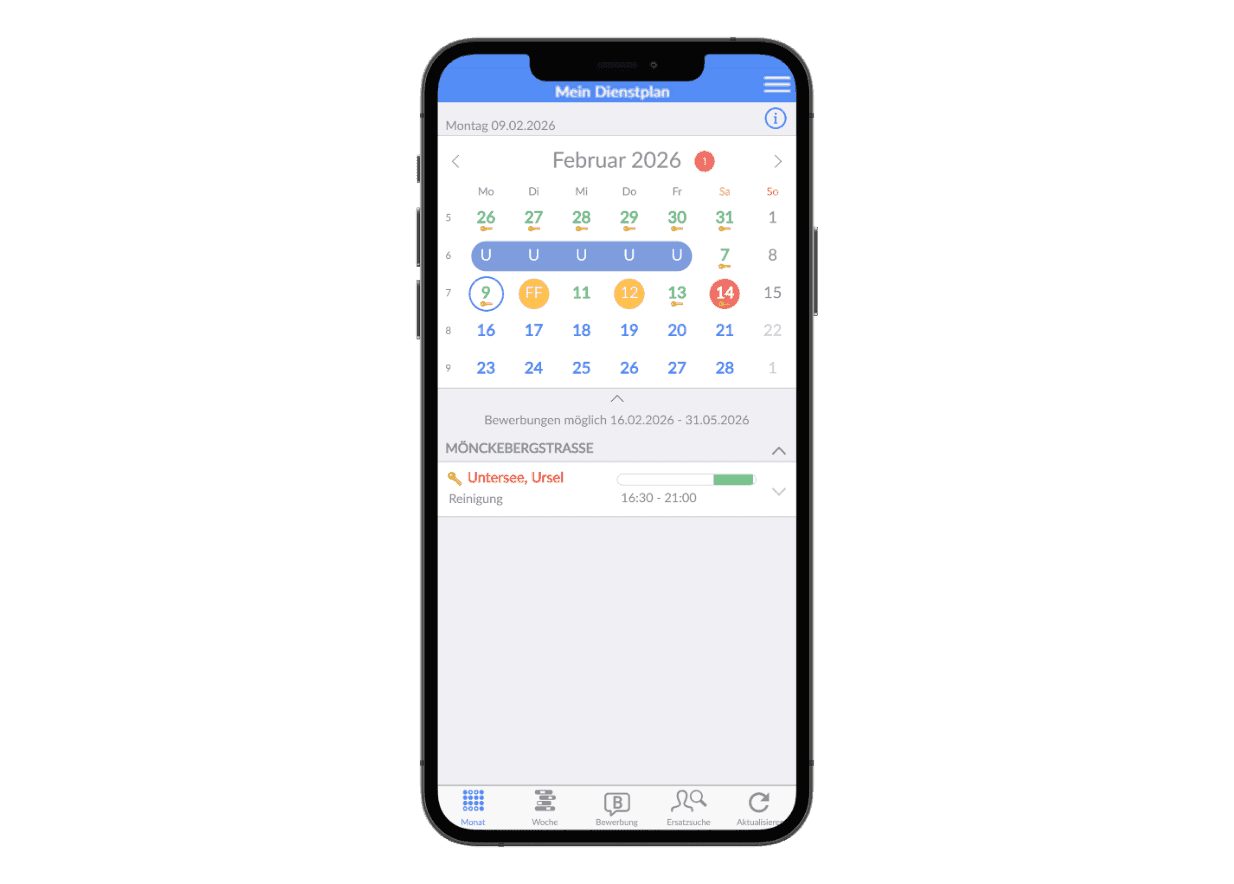
A digital scheduling app therefore delivers far more than a simple view of working hours: mobile accessibility, role-based views, clear change tracking, and built-in support for finding cover — all integrated into your broader workforce management process.
Mobile
Up-to-date schedules are always accessible across all locations — on smartphone, tablet, and desktop.
Current
Schedule changes are proactively pushed to all users and clearly flagged as unread updates.
Role-Based
Employees, managers, and branch locations each get exactly the view they need to do their jobs.
Transparent
Staffing levels, absences, and employee availability — all visible at a glance, with no manual follow-up needed.
Scalable
Individual locations, entire branch networks, and departments all operate on the same underlying logic.
The Trade Trusts SEAK
From retail chains and bakery franchises to service providers and cinema operators: multi-site businesses across Germany rely on SEAK to manage their workforce.
Features of the SEAK Scheduling App at a Glance
Digital schedules — or shift planning apps in the broader sense — need to support different roles, situations, and access methods. What matters most is that information is easy to grasp at a glance and that operational processes are directly supported.
Personal Schedules
Employees can view their schedule in monthly, weekly, and daily views — including shift times, breaks, locations, and any additional details.
Real-Time Plan Updates
Schedule changes are communicated instantly via push notification and clearly flagged as unread updates.
Submit Requests Digitally
Time-off requests, preferences, and shift-specific availability can be captured digitally in a structured, streamlined way.
Identify Swap and Replacement Opportunities
Team overviews make it easy to quickly find the right colleagues for shift swaps or last-minute cover.
Branch and Department Overviews
Managers get a centralized view of shifts, staffing, and absences across their entire area of responsibility.
Support for Outages
Instantly see which employees are available, unscheduled, or absent on any given day — enabling faster responses to sick leave and last-minute staffing gaps.
Subsidiary Scheduling Without Login
No individual login required for the branch schedule — yet it remains role-based, controlled, and always up to date.
Push Notifications
Important updates and announcements reach your team instantly — no bulletin boards, no WhatsApp workarounds.
Role and Permission Management
Visibility settings, user permissions, and publishing schedules can be precisely controlled by role.
Scheduling App for Retail and Adjacent Industries
Digital schedules need to adapt to diverse organizational structures and operational requirements. That's exactly where their practical value lies: one unified plan, tailored to each role and work environment.

Retail and Store Teams

Professional Services

Bakeries

Cinema Operations
Schedule a Free Consultation
We'd love to walk you through your options in a personal online meeting via Zoom and help you find the ideal workforce management solution for your business. Simply pick a time that works for you — your Zoom link will be sent to you by email.
Alternatively, you're welcome to reach out via our contact form — we'll get back to you promptly. Or give us a call at: +49 40 238 348 – 000
Frequently Asked Questions About the Scheduling App
What Is a Scheduling App?
A scheduling app gives employees, managers, and entire locations instant mobile access to published shift plans. It provides full visibility into shifts, changes, and absences — and streamlines processes like shift swaps, replacement requests, and availability preferences.
What's the difference between a scheduling app and scheduling software?
The two terms are often used interchangeably. In practice, "app" typically refers to the mobile experience used by employees and managers, while "software" describes the broader system — including scheduling and administration. SEAK delivers both in a single solution.
How do I create a schedule using the app?
Schedules are created directly within the planning environment — automatically at the click of a button or manually with interactive suggestions. Once published, they are instantly visible in the scheduling app, with push notifications sent automatically whenever changes are made.
Who is this solution designed for?
Designed for businesses with shift-based scheduling, multiple teams, departments, or locations — and for organizations that need to deliver schedules on mobile devices, with full transparency and role-based access. Especially valuable wherever last-minute changes need to be communicated reliably in day-to-day operations.
Can employees see schedule changes instantly?
Yes. Changes are actively pushed in real time and visually highlighted directly in the plan, so adjustments remain easy to spot at a glance.
How does the branch shift schedule work without individual login?
The branch schedule — displayed on a shared tablet in the back office, for example — requires no individual login. Visibility settings, role-based permissions, and publishing schedules remain fully controlled and granular.
Does the solution also support managers during staff absences?
Yes. Managers get a clear overview of shift assignments, absences, and available employees — making it easy to find replacements quickly.
Can the app be integrated into existing processes?
Yes. The scheduling app integrates with other SEAK modules — including deployment planning, time tracking, and absence management — fitting seamlessly into your existing workforce management workflows.